

Warehouse · Put-away
Put stock away in the right bin, every time
Right after receiving, Plur-e guides the operator to the destination bin, item by item or for the whole document at once.
Quick answer
Plur-e Put-away opens the warehouse put-away that Business Central creates after a receipt, lets the operator scan each item (or show all items to work in bulk), enter the quantity and the destination bin code, change the bin for one line or for all, search by bin, item, variant, serial or lot, and register the put-away in Business Central.
Received but not stored is not available
Stock that sits in the receiving area is invisible to pickers. Plur-e closes the gap between “received” and “stored” from the same device, with a scan to confirm every destination bin.
How it works
Put-away: how it works
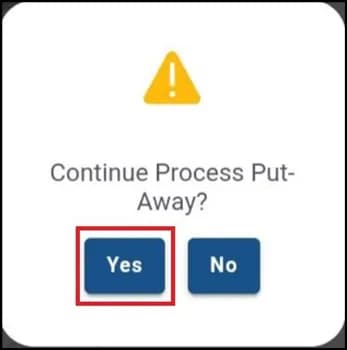
Decide to continue
After posting a receipt Plur-e asks whether to continue with put-away. Choosing “no” stops here; the put-away stays available in the module.
Edit or register directly
Simple cases can be registered as suggested by Business Central. Choose “edit” to change quantities or bins.
Scan or show all
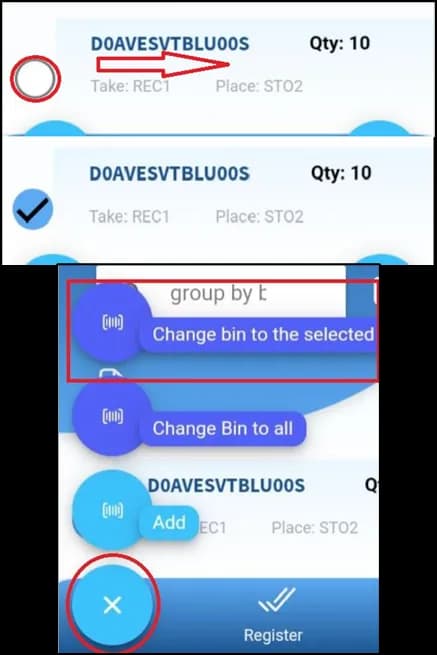
Scan items one by one for a detailed check, or choose “avoid scanning” to list every line and work in bulk.
Set the destination bin
Enter the quantity (non-serialized items) and the Bin Code. Use “Change bin to the selected” or “Change bin to all”.
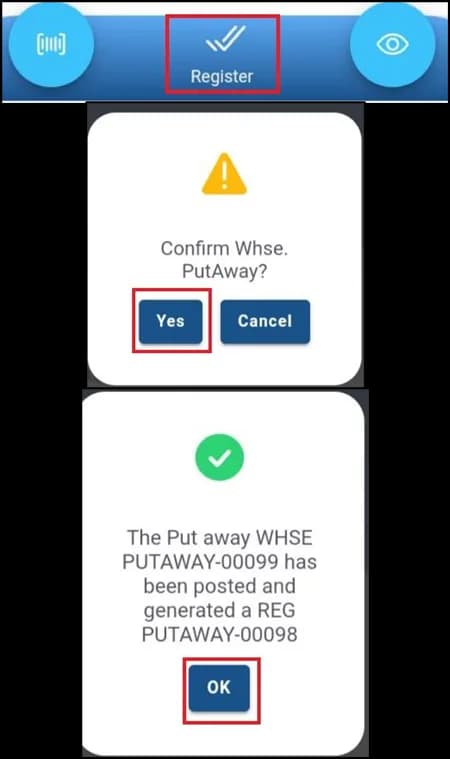
Register
Confirm and Plur-e registers the warehouse put-away in Business Central. Bin contents update immediately.
What this posts in Business Central
| Plur-e action | Business Central |
|---|---|
| Register put-away | Registered Warehouse Put-away; bin contents updated |
Offline behaviour
Put-away needs a connection: bins are validated against Business Central as you go and the put-away is registered from the device, with automatic retries when the network blips. Lines you have already edited stay on the device until you register.
Specifications
| Business Central pages | Warehouse Put-aways, Registered Put-aways, Bin Contents |
|---|---|
| Modes | Scan each item · Show all (bulk) |
| Bulk actions | Change bin to selected · Change bin to all · Remove all · Show all |
| Search | By bin, item, variant, serial or lot |
| Works offline | Yes — registers when back online |
FAQ
Frequently asked questions
Put your AI, Business Central and Dynamics 365 CRM to work together
Book a 2-hour MCP discovery workshop, or start the 30-day trial of Plur-e Mobile from AppSource.